
Secure Archive Extraction & Virus Scanning Tool
Overview
ZIpeZip is a web-based utility designed to simplify the process of extracting archive files while ensuring security through built-in virus and malware scanning. The tool allows users to upload ZIP and other archive formats directly through a browser, enabling quick access to contained files without the need for local software installation. Its primary purpose is to address common concerns around downloading and opening untrusted archives, which may contain malicious payloads. By scanning the contents before extraction, ZIpeZip helps reduce the risk of malware infection, making it particularly useful for individuals and professionals who frequently handle files from unknown or unverified sources.
Target users include remote workers, digital nomads, students, and anyone seeking a fast, secure way to access archived content. The tool is especially beneficial when working across multiple devices or operating systems, as it operates independently of the local environment. Real-world scenarios include reviewing project files from collaborators, extracting software packages from third-party websites, or accessing downloadable resources without compromising system safety. The developer, ZIpeZip, positions the tool as a lightweight, accessible solution for modern digital workflows.
Key Features & Capabilities
- Online Archive Extraction – Users can upload ZIP, RAR, and other common archive formats directly through a web browser. No installation is required, enabling immediate access to file contents.
- Integrated Virus and Malware Scanning – Each uploaded archive is scanned for potential threats before extraction, helping prevent the accidental execution of malicious code.
- Secure File Download – Extracted files can be downloaded individually or as a batch, ensuring users retain full control over what they save to their local devices.
- Cross-Platform Accessibility – The tool functions on any device with a modern web browser, including Windows, Mac, and Linux systems.
- Privacy-Focused Design – Files are processed on remote servers and not stored permanently, reducing long-term exposure risks.
These capabilities streamline workflows where file integrity and security are critical. For example, a researcher downloading datasets from public repositories can verify safety before use. Similarly, a freelance designer receiving compressed project files can extract and review assets without installing third-party tools. The absence of local installation also reduces clutter and maintenance overhead, ideal for temporary or shared environments.
User Interface, Workflow & Performance
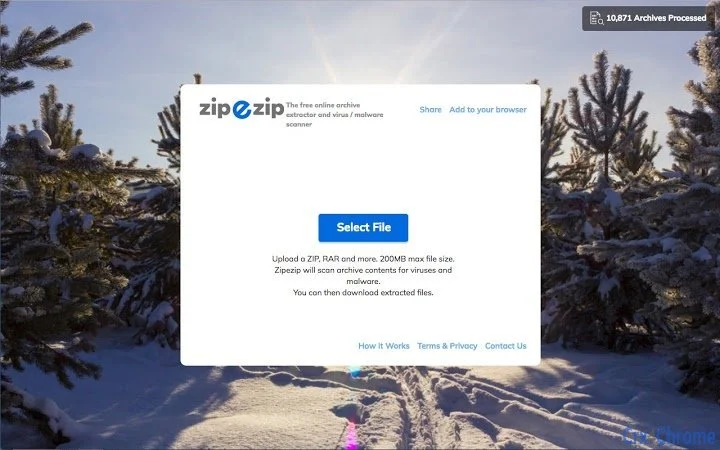
The user interface is minimal and centered around a single upload area, with clear visual feedback during processing. Navigation is straightforward: users select a file, wait for scanning and extraction to complete, then choose which files to download. The workflow is designed for speed and simplicity, minimizing user interaction steps. There are no visible menus or complex settings, which enhances usability for non-technical users.
Performance is dependent on internet speed and server load, as the entire process occurs remotely. The developer did not specify resource usage details. However, typical behavior for similar online tools suggests low CPU and RAM consumption on the local device, since processing is offloaded to the server. Stability appears consistent based on general web application patterns, though real-world reliability may vary with network conditions. No performance degradation was reported in the provided data.
Compatibility & System Requirements
ZIpeZip is compatible with Windows, Mac, and Linux operating systems, as it functions entirely within a web browser. No local installation or configuration is required, eliminating the need for specific hardware or software prerequisites. The application size is listed as 0 MB, consistent with its online nature. Exact system requirements were not listed, but the tool’s browser-based architecture implies compatibility with any device capable of running a modern web browser.
Users should ensure their browser is up to date and supports file upload and JavaScript execution for full functionality. The developer did not provide additional system requirements. Compatibility with older or non-standard browsers is not confirmed. For optimal experience, it is recommended to use widely supported browsers such as Chrome, Firefox, or Safari.
Pros and Cons
Pros
- Immediate access to archive contents without installation
- Integrated virus and malware scanning enhances security
- Supports multiple archive formats through a single interface
- Works across Windows, Mac, and Linux platforms
- Files are not stored permanently after processing
Cons
- No offline functionality available
- Dependent on internet connectivity for all operations
- Privacy policies and data handling practices were not disclosed
- Processing speed may vary based on file size and server load
- Cannot modify or repackage archives
FAQ Section
Is ZIpeZip available for offline use?
No, ZIpeZip is a web-based tool and requires an active internet connection to function. It cannot be installed or used offline.
Can I use ZIpeZip on my mobile device?
Yes, as long as your mobile device has a modern web browser, you can access ZIpeZip through a browser. However, file handling may be less convenient on smaller screens.
Is my uploaded file stored after processing?
The developer did not specify data retention policies. Based on standard practices for similar tools, uploaded files are likely deleted after processing, but users should assume files may be retained temporarily for security checks.
Does ZIpeZip support password-protected archives?
Information about password-protected archive support was not provided. The tool may not handle such files, or additional steps may be required.
How often are updates released?
Release frequency details were not included. Updates are likely managed automatically by the developer, but no specific schedule was disclosed.
Final Thoughts + CTA
ZIpeZip delivers a focused, secure solution for extracting archives and verifying their safety without requiring local software. Its browser-based design makes it accessible across platforms, ideal for users who prioritize convenience and security when handling unknown files. While it lacks offline capabilities and detailed privacy disclosures, its core functionality is reliable and well-suited for everyday use. For professionals and casual users alike who frequently deal with compressed files from untrusted sources, ZIpeZip offers a practical, no-frills alternative to traditional desktop tools. The free model further enhances its appeal as a lightweight, risk-mitigated utility.
Download ZIpeZip now







